
Contact Us Book a Demo
Reporting Requirements Corporate Reporting
ESEF · iXBRL annual financial reporting

Turn your annual report into ESEF iXBRL.

For finance teams preparing an ESEF annual report, Report Authority brings document preparation and iXBRL tagging together. Tag a report you already have, or connect its content to source data for future reporting periods.
Primary outputiXBRL annual report
Typical sourceExisting or connected annual report
ProductReport Authority
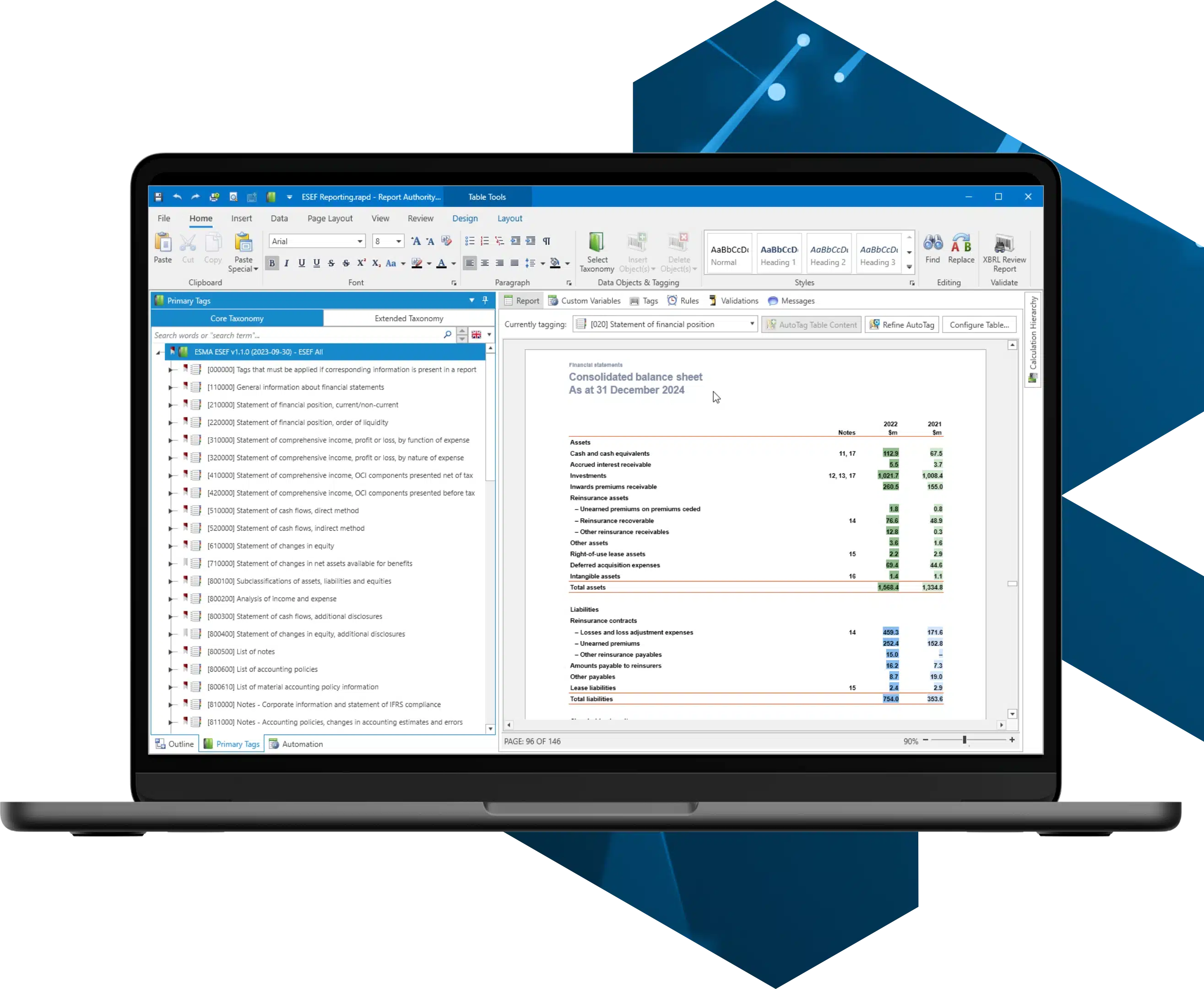
Report Authority tagging workspace with financial statements alongside taxonomy concepts.
Report Authority · financial statement tagging workspace
Where Report Authority fits

Keep the report readable.
Add the ESEF tags.

Keep your annual report readable while tagging the relevant financial information. Prepare the document, apply taxonomy tags and review technical issues in Report Authority before generating the output.

01

Start with your report

Import a PDF or Word report, bring in content from Excel, or prepare a connected document in Report Authority.

02

Tag the relevant information

Map figures and disclosures to the selected taxonomy, with company-specific extensions where needed.

03

Review technical issues

Use validation feedback to review tagging, taxonomy and report-package issues before submission.

04

Generate the ESEF output

Generate the iXBRL/XHTML report package for your review and filing process.

Two ways to use Report Authority

Tag an existing report.
Or build a reusable one.

Keep your existing document process or use Report Automation to connect report content to source data. The right setup depends on how your team works and the modules you use.

A Tag an existing annual report Import your prepared document, apply tags and extensions, then review validation feedback and generate the ESEF package.
or
B Maintain a connected report Link report content to supported data sources, refresh it for the next period and review the document and tags before generating the output.
The ESEF workflow

Prepare. Tag. Review.
Generate your ESEF report.

Start with your annual report, apply the tags and review the results before generating the ESEF output. Report Authority supports the technical work; your team reviews the report and follows the relevant filing process.

1

Bring in the report

Import your prepared annual report, or refresh a connected document using the modules and data sources in your setup.

2

Apply and review the tags

Map figures and disclosures to taxonomy concepts and add company-specific extensions where needed.

3

Review before sign-off

Work through validation feedback and use the downloadable tagging review report to support internal checks.

4

Generate the output

Export the ESEF package, review it and follow the submission process for your filing destination.

What Report Authority handles

Support the process.
Keep your team in control.

Use Report Authority to prepare, tag and review the report with the modules in your setup. Technical validation supports your checks; it does not guarantee acceptance by a filing authority.

Report Authority handles
  • Document preparation and reusable templates with Report Automation
  • Connections to supported financial data sources
  • ESEF taxonomy tagging
  • Extension taxonomy creation
  • Downloadable tagging review report
  • Technical validation
  • Generation of the final iXBRL/XHTML package
Your team reviews
  • Accuracy of the underlying financial statements
  • Accounting policies and judgements
  • Applicable disclosure obligations
  • Management and auditor sign-off
  • Submission requirements and the filing outcome
Built for recurring annual reporting

Build on last year’s report.

With a connected report, reuse the document structure and refresh supported source data for the next period. Review changes in figures, disclosures and tags before generating the new output.

Reuse the structureStart from the existing layout and update the content for the new reporting period.
Refresh connected dataUpdate linked figures from supported sources, then review them in the report.
Review what has changedCheck the current disclosures, taxonomy requirements and tags before generating the next report.
Report Authority
Powered by Report Authority

Reporting beyond ESEF.

Explore Report Authority’s wider financial and regulatory reporting workflows, with document preparation, connected data and XBRL/iXBRL tagging across its reporting modules.

Explore Report Authority
ESEF reporting FAQ

Questions about your ESEF workflow.

Can Report Authority tag an existing annual report?

Yes. An existing report can be imported and used as the basis for applying ESEF taxonomy tags, extensions and validation without first rebuilding the document as a connected report.

Can we automate more of the annual report process?

Yes. Report Authority can also be used as a connected report writer, linking report content to supported source data so the document can be refreshed and reused in later reporting periods.

Does Report Authority support taxonomy extensions?

Yes. Report Authority supports company-specific taxonomy extensions where a suitable concept is not available in the selected taxonomy. Review the required concepts and relationships as part of the tagging process.

What format is an ESEF report?

ESEF annual financial reports use XHTML. Where IFRS consolidated financial statements are included, those statements are tagged using Inline XBRL. Review the current requirements for your report and filing destination.

Can Report Authority connect to our financial data?

Yes. Report Authority can connect report content to supported sources including Microsoft Excel, OneStream, Oracle HFM and Essbase, allowing recurring values and tables to be refreshed from the underlying data.

How do we choose the right reporting modules?

XBRL Tagging supports tagging an existing document, while Report Automation supports connected report preparation. Discuss your current process so the modules and data connections needed for your workflow can be confirmed.

See the ESEF workflow

Find the right workflow
for your annual report.

See how tagging an existing report compares with a connected, reusable reporting setup, and discuss which approach fits your team.

“Big thank you to your support team today! This is why we like being an Authority Software client.”
Mark Fitzpatrick— DM Financial
“The support has been fantastic and the developers are welcoming and responsive to feedback and suggestions. Highly recommended.”
Richard Revill— Associate Director - Complyport Ltd
“I have sung your praises (and team) to anyone who would listen over the years.”
Dave Carroll— Capital and Leverage Management - Barclays
“The amount of support and help that you offered is hard to forget. I still have you as an example whenever I talk about service minded companies.”
Jesper Sidestål— Redovisningsekonom - Marginalen Bank
“Just wanted to thank you one more time. I really appreciated the effort you put in.”
Reporting Manager— Marginalen Bank
“Thank you very much for your quick and very explanatory answers! We know that you are extremely service minded, but I have to say that the speed with which you helped us exceeded our already high set expectations!”
Project Manager— Group Capital Management - Large Nordic Bank
“I would like to thank you for your reactivity and professionalism. With you I had a great help and solution oriented competence! Just as an appreciation, your softwares are easy to use and reliable, which make them appropriate for the Luxembourgish market: indeed there are some more sophisticated one’s but not as user friendly and accurate.”
Jean-Yves Burgun— Finance Consultant - RiverBank
“Report Authority has been designed from the outset to allow accountants to take ownership of XBRL document generation in-house by shielding them from the complexity of XBRL syntax.”
Gary Simon— Group Publisher - FSN Publishing Limited
“Great product and it found errors that others had missed.”
Fiona Carton— European Compliance Manager and MLRO — Lumon
“Both returns have been submitted. The software is pretty easy to use for our purposes.”
Kseniia Iusupova— Group Financial Controller — Metdist Ltd
“The software is continually updated to incorporate new taxonomy changes which was a challenge previously.”
DPM Authority customer
“We have been a happy user since 2014. The system has proved easy to use and extremely reliable. Updates are frequent and timely.”
Richard Revill— Associate Director - Complyport Ltd