
Contact Us Book a Demo
Universal XML Regulatory Reporting

Take the complexity out of XML reporting.

Convert Excel and SQL data into XML for 250+ regulatory reporting schemas.

On-premise Schema-driven Real-time validation Flexible data import options
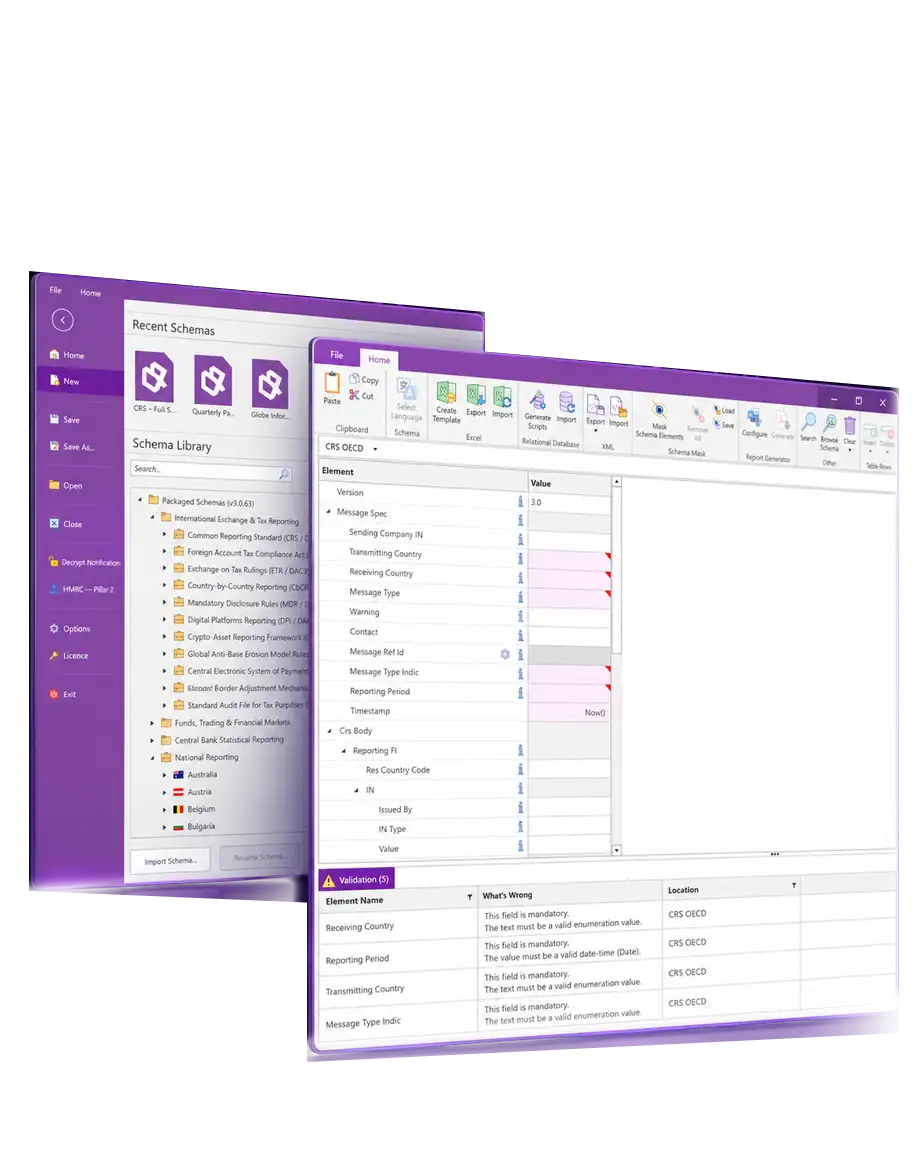
XML Authority schema library and CRS reporting windows with data validation.

TRUSTED BY REPORTING TEAMS WORKING ACROSS MULTIPLE JURISDICTIONS

Rolex CBRE Investec PwC KPMG HSBC

Work with the report.
Not the XML.

XML Authority presents reporting schemas as clear forms and tables, giving you a view of every data requirement before you generate your XML file.

01

Extensive regulatory coverage

Create XML reports based on regulators’ reporting schemas (XSD), across jurisdictions and mandates.

02

Schema-driven templates

Turn complex schemas into intuitive forms and tables, with mandatory field indicators and supporting documentation built in.

03

Real-time validation

Validate data as it’s entered and jump straight to any issue before you export your XML file.

04

Connect to your data

Populate reports automatically from Microsoft Excel or relational databases, so your team can focus on review rather than rekeying data.

Reporting coverage

One engine for your XML reports.

XML Authority is updated with the latest schemas, helping you keep pace with regulatory changes. Explore reporting requirements across tax, funds, financial markets and central banking.

Reporting frameworksMore tax & information exchangeView examples
  • DAC3 / Exchange on Tax Rulings
  • DAC6 / Mandatory Disclosure Regime
  • CBAM
  • SAF-OSS
Reporting frameworksMore markets & fundsView examples
  • Securities Financing Transactions Regulation (SFTR)
  • Securitisation disclosure reporting
  • CSDR settlement-fails reporting
  • SEC reporting forms
Reporting frameworksCentral-bank & payment formatsView examples
  • Money Market Statistical Reporting (MMSR)
  • Payment statistics
  • Securities Holdings Statistics (SHS)
  • ISO 20022 / SEPA
Can’t find your reporting requirement?

Find your country or jurisdiction.

Explore national examples recorded in our schema release history. Open a card to see the reporting requirements.
National schemasAustraliaView examples
  • CRS
  • Sharing-economy reporting
  • Payment-system transactions (EPMTSYSTX)
National schemasAustriaView examples
  • E-Bilanz
  • GIR
  • Specified FinanzOnline returns
National schemasBelgiumView examples
  • Pillar 2 QDMTT / IIR and notifications
  • Payment statistics
  • DAC7
National schemasBulgariaView examples
  • SAF-T
  • DAC7
National schemasCanadaView examples
  • CRS and FATCA
  • Digital-platform reporting
National schemasCroatiaView examples
  • DAC7
National schemasCzechiaView examples
  • Mojedane
  • VAT
  • DAC7
National schemasDenmarkView examples
  • FIONA
  • SAF-T
  • IAF
  • DAC7
National schemasEstoniaView examples
  • Fund-manager reporting to Finantsinspektsioon
  • DAC7
National schemasFinlandView examples
  • Suomen Pankki reporting
  • GoAML
  • CRS / DAC2 and FATCA
National schemasFranceView examples
  • GIR 2259-SD
  • Banque de France Fraude / Cartographie / non-IFM
  • DAC7
National schemasGermanyView examples
  • Bundesbank AnaCredit
  • Investment-assets and payment statistics
  • GIR, CRS and Intrastat
National schemasHong KongView examples
  • CRS
  • Country-by-Country Reporting
National schemasHungaryView examples
  • DAC7
National schemasIrelandView examples
  • CBI AML/CFT REQ, ISBAR and MMIF
  • Payment statistics and AnaCredit
  • Revenue Enhanced Reporting Requirements (ERR)
National schemasIsraelView examples
  • CRS
  • FATCA
National schemasItalyView examples
  • DAC7
National schemasJapanView examples
  • FATCA
National schemasKenyaView examples
  • MDES CRS / FATCA
National schemasLatviaView examples
  • DAC7
National schemasLithuaniaView examples
  • P0607 / S0607 payment and fraud statistics
  • VMI schemas
  • DAC7
National schemasLuxembourgView examples
  • BCL statistics and AnaCredit
  • eCDF / ACD Mod 500
  • CSSF U1.1
  • CRS, FATCA and CbCR
National schemasMacaoView examples
  • AEOI / CRS
National schemasMaltaView examples
  • Centralised Bank Account Register (CBAR)
  • Payment statistics
  • Depositor Compensation Scheme (DCS)
National schemasNetherlandsView examples
  • GIR
  • Bankgegevens
  • CESOP
  • DAC7
National schemasNorwayView examples
  • SAF-T
  • VAT
  • CRS and FATCA
National schemasPolandView examples
  • JPK
  • FATCA and CBC-P
  • Intrastat
National schemasPortugalView examples
  • CMVM and Banco de Portugal schemas
  • SAF-T
  • DMIS
National schemasRomaniaView examples
  • SAF-T
  • Country-by-Country Reporting
  • Intrastat
National schemasSingaporeView examples
  • MAS Notice 610 / 1003
  • IRAS CRS and CbCR
National schemasSlovakiaView examples
  • General submission for FS
  • DAC7
National schemasSloveniaView examples
  • VAT
  • DAC7
National schemasSpainView examples
  • Modelo 170 / 196 / 241
  • CRS
  • DAC7
National schemasSwedenView examples
  • VINN securities holdings
  • CRS and FATCA
National schemasUnited KingdomView examples
  • FCA RegData
  • Bank of England Branch Return
  • HMRC Pillar 2
National schemasUnited StatesView examples
  • Form PF
  • SEC 13F / 13D / 13G / N-PX / SHO / SBS
  • IRS FATCA
Reporting catalogue Explore all reporting frameworks.
Explore XML Authority

From reporting data to XML.

One clear workflow from reporting data to XML.

  1. Choose your report.Select the schema and version for your jurisdiction.
  2. Bring in your data.Enter data directly in forms and tables, or import it from Excel, XML, or a relational database.
  3. Resolve any issues.Follow validation messages straight to the fields that need attention.
  4. Generate your XML.Export your report for the next step in your filing process.
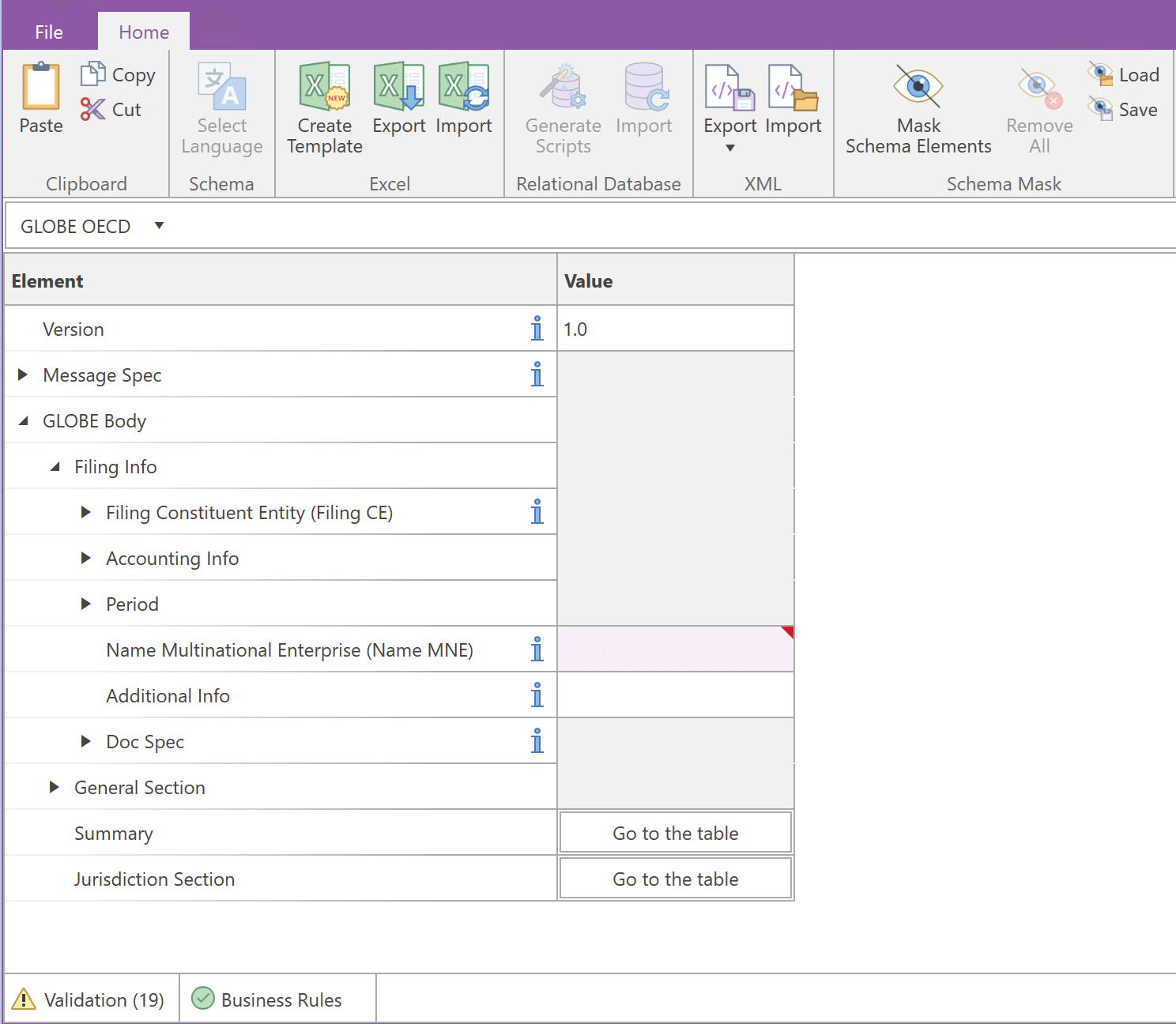
XML Authority GLOBE OECD reporting schema presented as a form, with Excel and XML tools in the ribbon.
Your reporting schema, presented as forms and tables. GLOBE OECD shown.

Your data. Your environment.

Prepare, validate and store your reports locally with XML Authority for Windows. Keep sensitive reporting data within your own IT environment.
  • Local processing — Prepare and validate reports on your Windows computer or server.
  • Data stays in your environment — XML Authority processes reporting data locally during preparation and validation.
  • Deployment and updates — Your IT team can manage installation and coordinate software updates through its own change-control process.
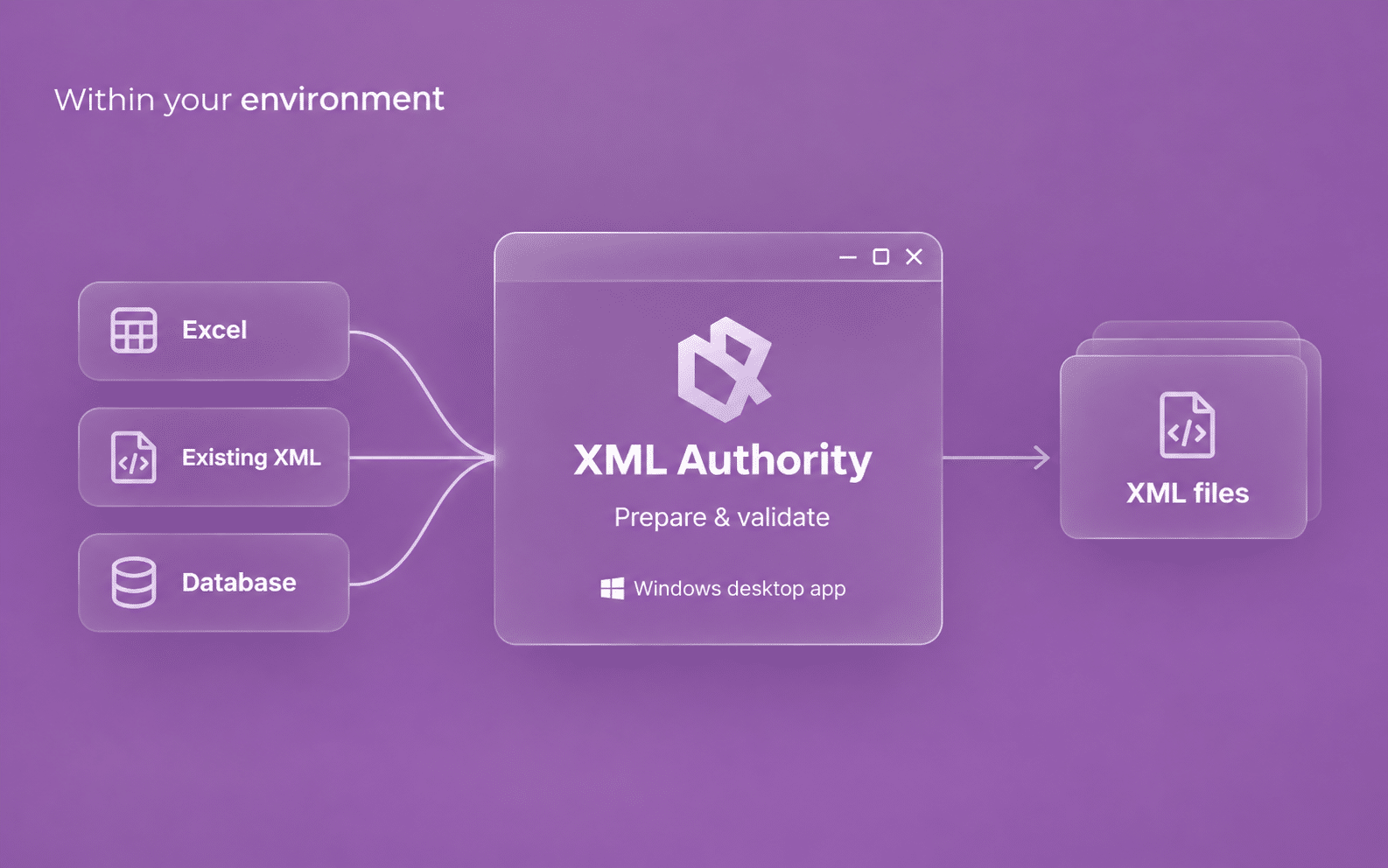
Within your environment: Excel, existing XML and database data flow into the XML Authority Windows desktop application for preparation and validation, then out to XML files.

Bring existing data into your report.

Enter data directly in forms and tables, or import it from Excel, XML, or a relational database.
  • Excel and XML import: bring spreadsheet data or previous XML reports into compatible reporting schemas.
  • Relational databases: connect your existing reporting data.
  • Custom schemas: load compatible XSDs outside the schema library.
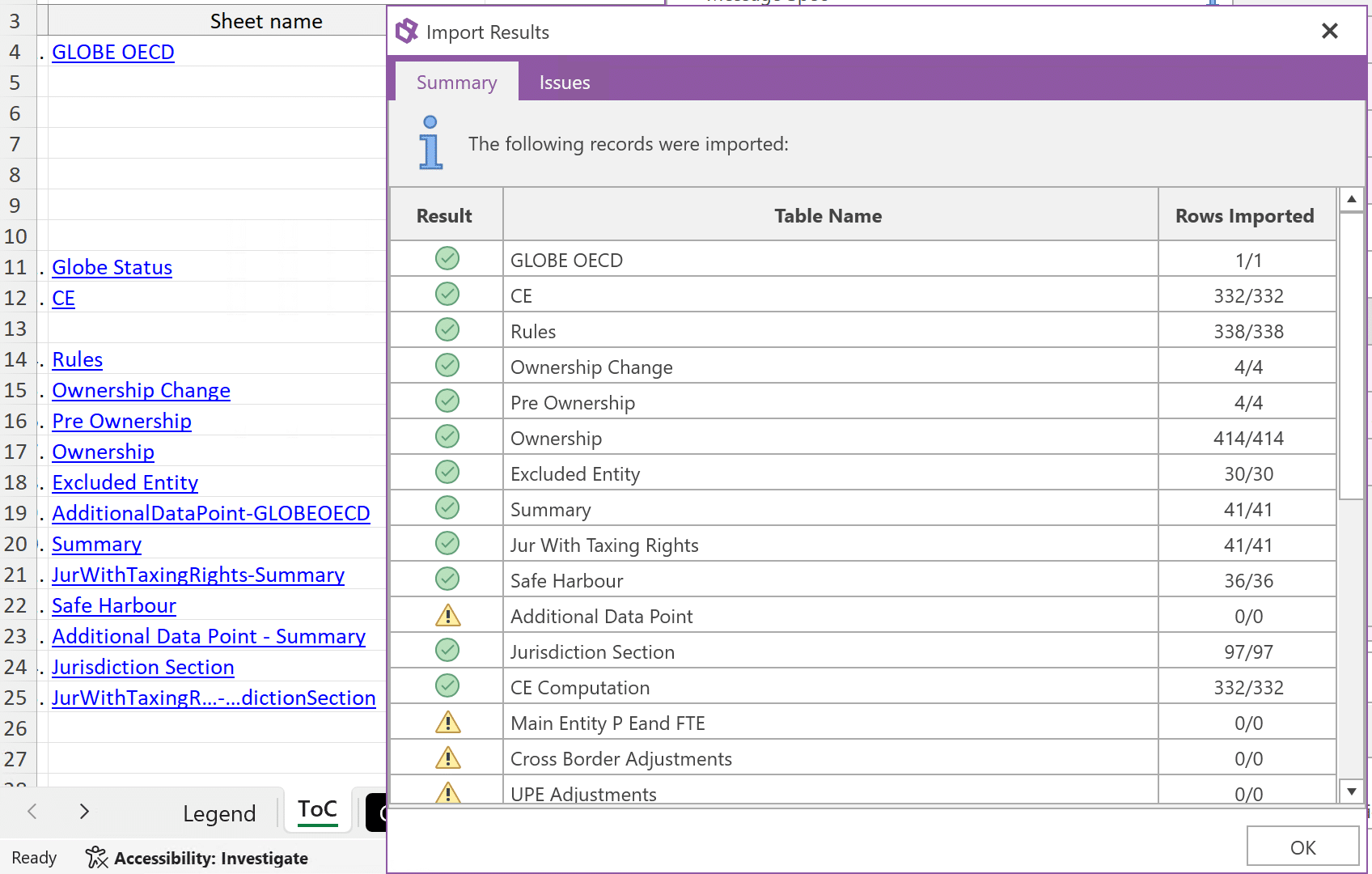
XML Authority Import Results window with the Excel worksheet and workbook tabs visible behind it. Demo data.
From Excel to XML Authority. Import results with the source workbook behind.

Resolve validation issues before export.

Check required fields, data types and formats as you enter data. Validation messages help you find the data that needs attention before you generate your XML file.
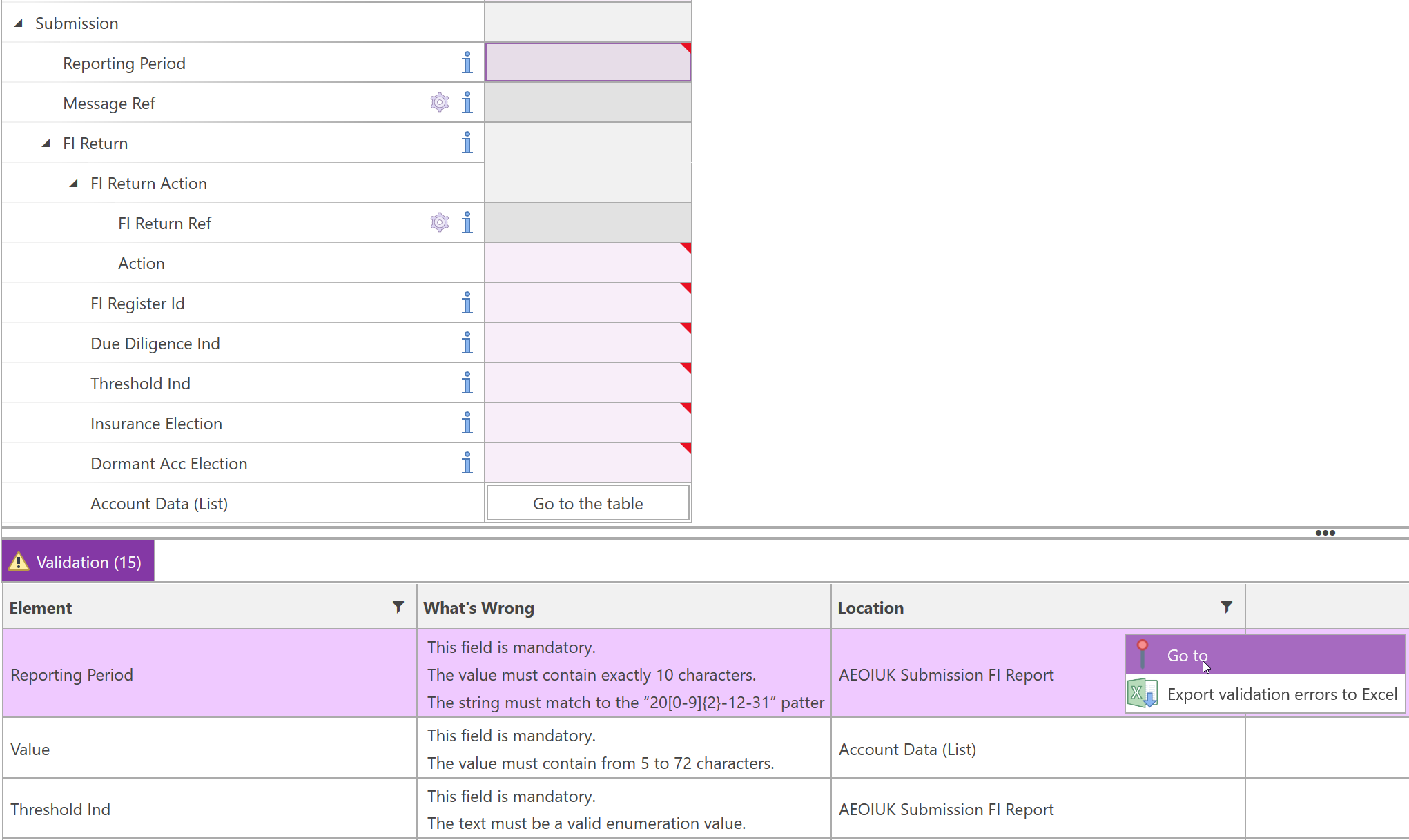
  • Required fields: see which reporting data is missing.
  • Schema checks: review data types and formats as you work.
  • Check your report against additional business rules for supported schemas. We can add further checks on request.
XML Authority validation panel identifying required reporting data.
Move from a validation issue to the field that needs attention.

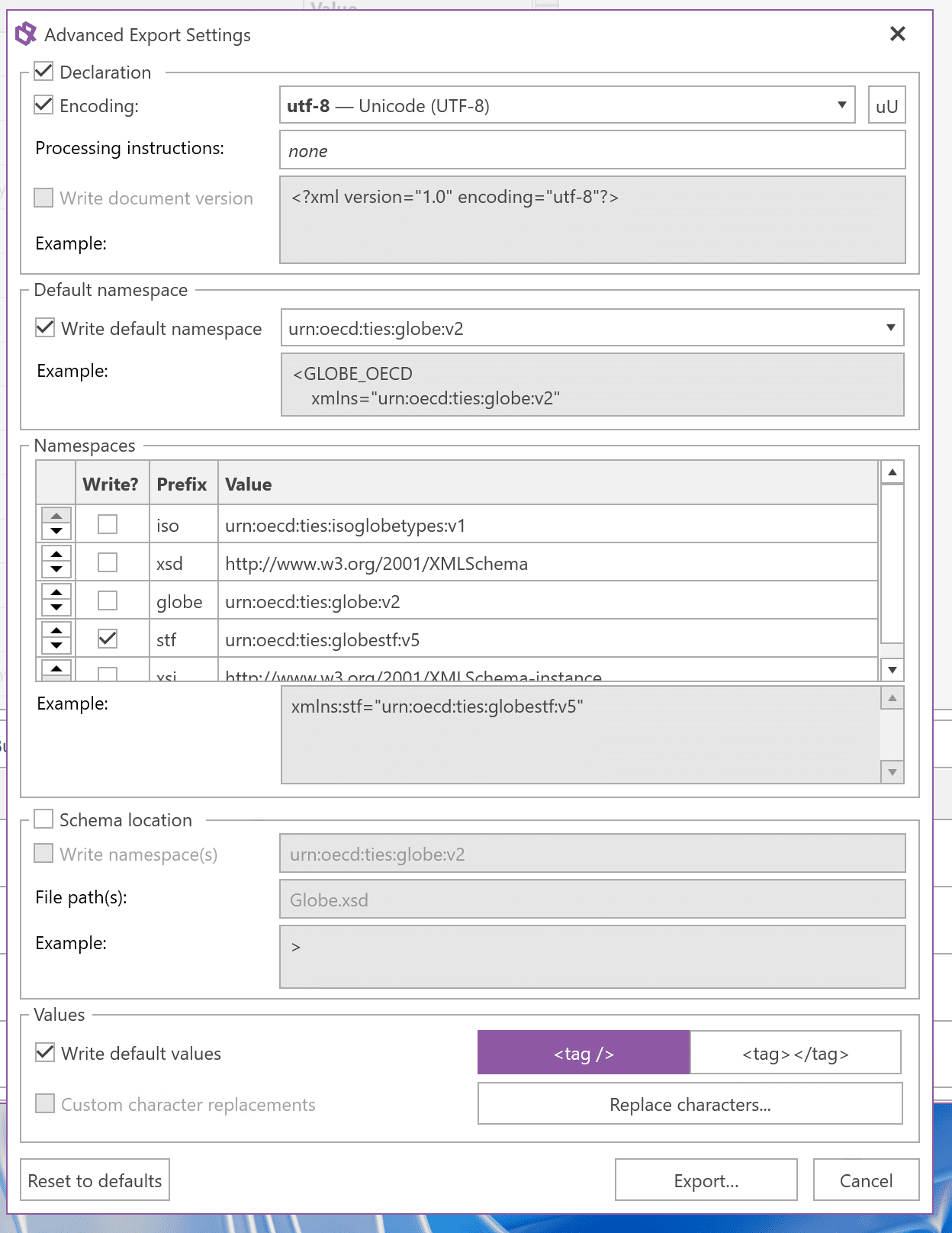
Export XML and connect to filing systems.

Export your report as XML, or use an available integration to transfer it directly for supported filing routes.
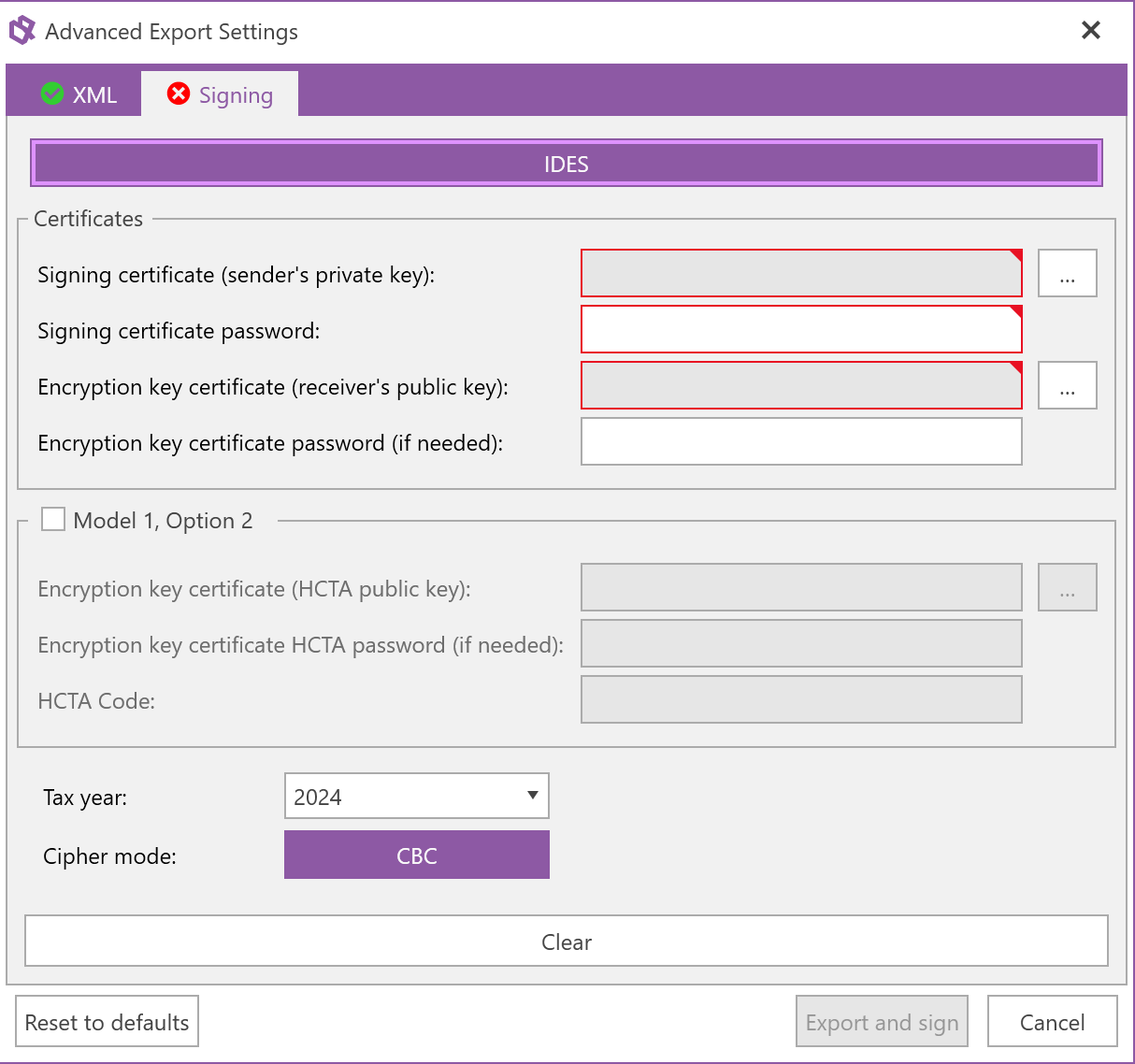
  • FATCA IDES: sign, encrypt and package your FATCA XML for transmission.
  • FinanzOnline: submit specified Austrian returns.
  • HMRC Pillar 2: use the filing integration for supported returns.
XML export settings for declaration, namespaces, schema location and values.
FATCA IDES export settings for signing, encryption and packaging.
Advanced export options

See how XML Authority fits your reporting.

Book a demo
“Big thank you to your support team today! This is why we like being an Authority Software client.”
Mark Fitzpatrick— DM Financial
“The support has been fantastic and the developers are welcoming and responsive to feedback and suggestions. Highly recommended.”
Richard Revill— Associate Director - Complyport Ltd
“I have sung your praises (and team) to anyone who would listen over the years.”
Dave Carroll— Capital and Leverage Management - Barclays
“The amount of support and help that you offered is hard to forget. I still have you as an example whenever I talk about service minded companies.”
Jesper Sidestål— Redovisningsekonom - Marginalen Bank
“Just wanted to thank you one more time. I really appreciated the effort you put in.”
Reporting Manager— Marginalen Bank
“Thank you very much for your quick and very explanatory answers! We know that you are extremely service minded, but I have to say that the speed with which you helped us exceeded our already high set expectations!”
Project Manager— Group Capital Management - Large Nordic Bank
“I would like to thank you for your reactivity and professionalism. With you I had a great help and solution oriented competence! Just as an appreciation, your softwares are easy to use and reliable, which make them appropriate for the Luxembourgish market: indeed there are some more sophisticated one’s but not as user friendly and accurate.”
Jean-Yves Burgun— Finance Consultant - RiverBank
“Report Authority has been designed from the outset to allow accountants to take ownership of XBRL document generation in-house by shielding them from the complexity of XBRL syntax.”
Gary Simon— Group Publisher - FSN Publishing Limited
“Great product and it found errors that others had missed.”
Fiona Carton— European Compliance Manager and MLRO — Lumon
“Both returns have been submitted. The software is pretty easy to use for our purposes.”
Kseniia Iusupova— Group Financial Controller — Metdist Ltd
“The software is continually updated to incorporate new taxonomy changes which was a challenge previously.”
DPM Authority customer
“We have been a happy user since 2014. The system has proved easy to use and extremely reliable. Updates are frequent and timely.”
Richard Revill— Associate Director - Complyport Ltd

A licence that fits your reporting

Tell us how you report.

Whether you prepare reports yourself, work across a team or report for clients, we’ll help you choose the right edition and licensed options.

  • For individual reporting. Start with the tools you need to enter, validate and generate your XML reports.
  • For reporting teams. Reuse Excel and XML data, add users and connect database data where your workflow needs it.
  • For service providers. Discuss the Enterprise licence and workflow for reporting on behalf of clients.
Compare editions
Essential
Manual data entry, schema-library forms and tables, real-time validation and XML generation for an individual user.
Professional
Everything in Essential, with compatible custom schemas and data import from Excel or previous XML reports. Additional users are available.
Enterprise
Everything in Professional, with relational-database import, three included users and premium support with interactive training.

Business-rule checks for selected schemas, FATCA IDES signing, encryption and packaging, and supported online filing are separately licensed options. Service providers reporting for clients require Enterprise.

Questions & answers

Frequently asked questions about XML Authority

Answers to common questions about XML reporting, schema compatibility, data imports, validation and deployment.

What is XML Authority, and what is it used for?

XML Authority is Windows desktop software that turns XML schemas (XSDs) into forms and tables. Prepare, validate and generate regulatory XML reports without writing XML code.

Do I need to understand XML to use XML Authority?

No. Use forms and tables to enter data, review required fields and resolve validation issues without writing XML.

Can XML Authority generate XML reports from Microsoft Excel?

Yes. Professional and Enterprise can import Excel data into reporting templates, ready for validation and XML export.

Can I import an existing XML report from another reporting system?

Yes. Professional and Enterprise let you reuse data from previous XML filings. The data must match the schema selected for the new report.

Can I load my own reporting schema?

Yes. Professional and Enterprise let you load compatible XML schemas (XSDs) that are not in the library. The software creates the reporting interface and validation checks from the schema.

How does XML Authority validate regulatory reports?

XML Authority checks required fields, data types and formats as you work, and takes you straight to the fields that need attention. Additional business-rule checks are available for supported schemas, and we can add further checks on request.

Can XML Authority support reporting in my jurisdiction?

Standards such as CRS and Country-by-Country Reporting each have a common core schema, with local differences such as identifiers and file names. Our library includes country-specific implementations. Tell us your jurisdiction and reporting requirement so we can confirm the right schema and version.

Can XML Authority sign or submit a report?

XML Authority can sign, encrypt and package FATCA XML for transmission through IDES. Filing integrations can submit specified Austrian returns through FinanzOnline and supported HMRC Pillar 2 returns.

Is XML Authority cloud-based or installed locally?

XML Authority is a Windows desktop application. You can prepare, validate and store reports locally on an offline computer. Offline activation uses an internet-connected browser on another device; optional online filing requires connectivity.

See it in practice

See XML Authority in action.

Tell us what you need to report and where your data comes from. We’ll show you the relevant workflow and help you choose the right edition.

Book an XML Authority Demo